
WCAG, AODA & accessibility
Accessibility shouldn’t be an afterthought.
A website needs to work for everyone, whether that person using a mouse, keyboard, screen reader, zoomed text, captions, or assistive technology. We help find and fix the issues that make a site harder to browse, harder to trust, and harder to maintain.
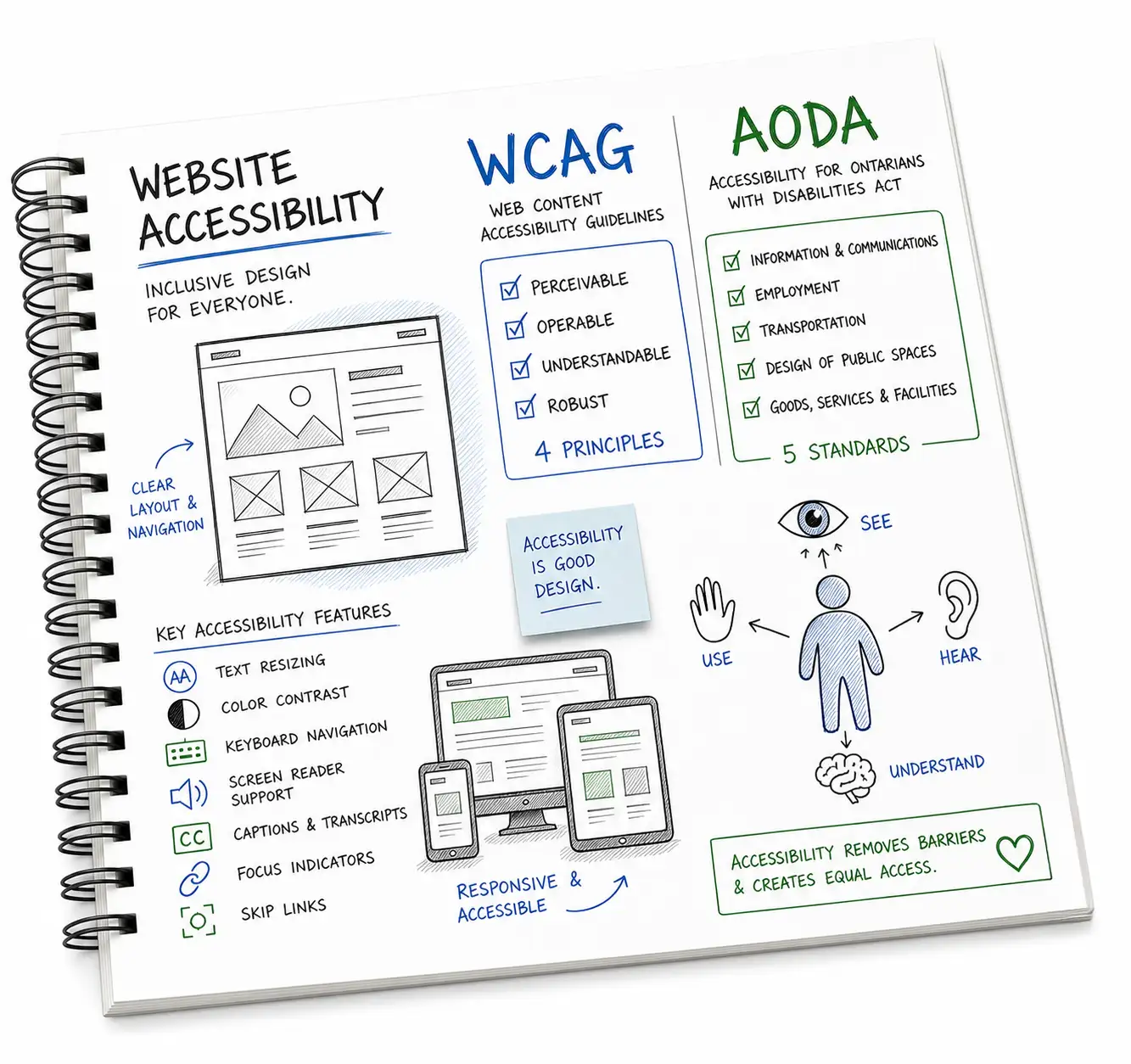
What WCAG and AODA mean.
WCAG stands for Web Content Accessibility Guidelines. WCAG is the gold standard used to measure website accessibility. The World Wide Web Consortium (W3C), an international organization that develops standards and guidelines for web accessibility, describes it as guidance for making web content “more accessible to people with disabilities.”1 It covers practical things like whether a site can be used by keyboard, whether images have useful text alternatives, whether colours have enough contrast, and whether forms make sense to assistive technology.
AODA stands for the Accessibility for Ontarians with Disabilities Act. This is Ontario’s accessibility law. Ontario rules and regulations stipulate certain organizations must make their public websites accessible, including businesses and nonprofits with 50 or more employees.2 Many requirements are tied to WCAG 2.0 Level AA for public websites and web content. We often use newer WCAG guidance as a practical benchmark too, because “technically acceptable” isn’t always the same as genuinely usable.
This isn’t legal advice. It’s practical help with the website side of accessibility, so your team can understand where the website falls short and what can be fixed.
Accessibility is about people, risk, and better websites.
People can actually use the site.
Accessibility is where design becomes practical. If someone can’t read the text, tab through the navigation, understand a form error, pause motion, zoom the page, or get useful context from an image, the site is getting in their way. WCAG gives us a shared checklist for removing those barriers, but the point is simpler than the checklist: more people can use the website without asking for help.5
Compliance risk is easier to manage.
A documented audit and remediation plan gives your organization a clearer path than guessing. For some organizations, Ontario accessibility reporting is also a legal obligation under AODA.4
Better usability helps everyone.
Clear labels, readable contrast, keyboard support, and sensible structure make the whole site stronger. W3C notes that WCAG can also make content “more usable to users in general,”3 and many of the same improvements support crawlability, content clarity, and practical SEO.6
What we look for, and what we can fix.
An accessibility audit shouldn’t be a scary spreadsheet tossed over the fence. We explain the issue, why it matters, how serious it is, and what needs to happen next.
We can fix virtually every non-compliant issue on a typical marketing, ecommerce, or content website. If the problem comes from a third-party plugin, embedded tool, or platform limitation, we’ll call that out clearly and explain what can still be controlled.
- Missing or unhelpful image alt text
- Poor colour contrast
- Headings used out of order
- Links and buttons with unclear names
- Keyboard navigation problems
- Focus states that are hard to see
- Forms without proper labels or errors
- Menus, modals, and sliders that don’t announce properly
- ARIA that’s missing, noisy, or incorrect
- Mobile zoom and reflow issues
- Video captions and transcript gaps
- PDF and downloadable document issues
- Tables without proper headers
- Missing skip links or page landmarks
Want to see what an accessibility audit includes?
Download a short sample report to see the kind of issues we document, how we prioritize them, and how recommendations are explained in plain language.
Practical support, not panic.
We review templates, key pages, forms, navigation, interactive elements, and common user paths.
You’ll know what’s urgent, what’s lower risk, and what should be handled during a redesign.
We can update markup, CSS, content, alt text, forms, components, documents, and design patterns. For most marketing and ecommerce sites, the majority of issues are fixable without a full redesign.
After fixes are made, we can retest the work and help your team avoid repeating the same issues.
Need a WCAG or AODA accessibility review?
Send your website and a bit of context. We’ll let you know whether an audit, a focused cleanup, or a broader accessibility pass makes the most sense. No pressure, no scare tactics.
Accessibility questions we hear often.
Do we have to be perfectly compliant before launching?
Not every organization has the same obligations or risk profile. What matters is understanding the gaps, prioritizing meaningful fixes, and avoiding avoidable barriers before they become bigger problems.
Can accessibility be added to an existing site?
Usually, yes. Some fixes are content or code changes. Others may require reworking components, templates, forms, navigation, or third-party tools. We’ll be clear about what’s realistic.
Is an automated scan enough?
Automated tools are useful, but they miss a lot. A real review needs human judgment, keyboard testing, content review, and an understanding of how people actually move through the site.
What's included in a WCAG compliance audit?
A WCAG compliance audit reviews your site's templates, key pages, forms, navigation, interactive elements, and common user paths against WCAG 2.1 or 2.2 Level AA criteria. You'll receive a prioritized report that explains each issue, why it matters, how serious it is, and what needs to happen to fix it.
Can you help after the audit?
Yes. We can fix issues directly, work with your development team, retest completed fixes, and help create better habits for future pages, campaigns, and documents.
Accessibility references used on this page.
- W3C, WCAG 2 Overview: “more accessible to people with disabilities.”
- Government of Ontario, How to make websites accessible: AODA requires certain organizations “to make all public websites accessible.”
- W3C, Web Content Accessibility Guidelines (WCAG) 2.2: “more usable to users in general.”
- Government of Ontario, Completing your accessibility compliance report: “Filing your report is a legal obligation.”
- Bureau of Internet Accessibility, Why Is WCAG Important for Web Design?: “Every person deserves equivalent access to the internet.”
- Boldare, Why follow WCAG standards?: notes that alt text can support users and “boost the content’s SEO ranking.”